AI-AIDED GRAPHIC DESIGN
MONDAYS & WEDNESDAYS
5 PM PT / 8 PM ET

AIā -ā AIDED GRAPHIC DESIGN
1 FEB 2027 - 29 MAR 2027
DURATION:
8 WEEKS
MONDAYS & WEDNESDAYS
5 PM PT / 8 PM ET
Turn AI into a creative team that takes your idea all the way to finished, on-brand work that's unmistakably yours.
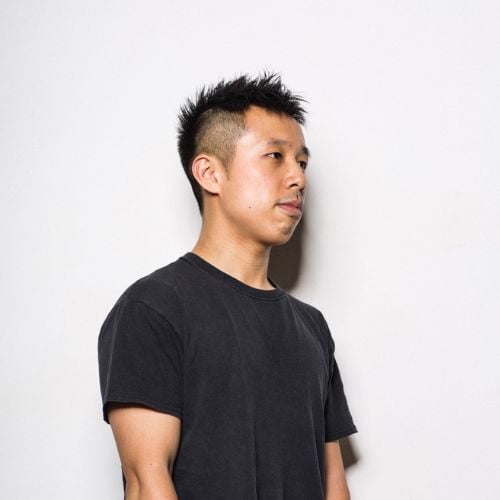
Tom Drymalski, an Executive Creative Director who led creative at Ogilvy and Publicis and advised Meta on generative video, will teach you to direct AI with real creative control.
THIS COURSE IS FOR YOU, IF...
-
YOU ARE A GRAPHIC DESIGNER
Your AI experiments keep looping back to the same generic outputs. This AI graphic design course teaches you to brief AI like a creative team, using reference-led prompting, image editing, and compositing alongside Photoshop and Figma. You'll leave directing AI with clear creative intent and a finished three-asset project that proves it.
-
YOU ARE AN ART DIRECTOR
Your AI-generated assets keep drifting off-brand and looking disconnected from each other. In this AI in graphic design course, you'll learn model selection, controlled revision, and the Keep / Fix / Kill critique framework to hold every output to your visual rules. You'll walk away able to build coherent visual systems that carry one master direction across every application.
-
YOU ARE A CREATIVE DIRECTOR
AI on your team is producing mood with no strategy behind it. This AI for graphic design course shows you how to turn creative briefs and research into AI direction, then evaluate every output against the brief. You'll scale your creative direction through AI while keeping strategic thinking and human judgment in charge.
Our students work in 1600+ companies worldwide

Five live workshops take you from a Brief + Destination Lab to a hands-on Controlled Repair of a flawed asset. Across five assignments, you'll build one project deck step by step, from your first creative idea to a finished visual system.
Guest speakers Miguel Delcan and E.J. Choi show how static design extends into motion and how AI workflows run in practice. Tom traces finished work back to its original idea and teaches the Keep / Fix / Kill framework for judging AI output against the brief.
Your final project is three finished, coordinated assets built from one brief, each serving a distinct communication purpose. You'll document the references, prompts, model choices, and rejected outputs behind them. The result is a portfolio case study that shows exactly where your design judgment shaped the work.
- Serves as Executive Creative Director at Table of Content
- Advised Meta as Creative Advisor for GenAI Visual Arts, evaluating generative video for realism and narrative coherence
- Led creative at Ogilvy and Publicis, working both agency-side and in-house
- Grew Citi's creative organization from 20 to 150+ people across 180 markets during the financial crisis
- Spent four years helping UiPath explain AI and automation to the world
- Helped position Nature's Bounty for its $5.75 billion acquisition by NestlƩ
- Won Gold at The One Show and the Effie Awards, with work recognized at Cannes Lions

Meet Tom and the course team, set up your final project deck, and see how each weekly assignment builds toward your finished, AI-directed brand system by the end of the course.
- Instructor and course team introductions
- Course structure and expectations
- Final project overview
- Setting up your Google Slides project deck
- Tool access and approved equivalents
Learn to define a focused graphic design brief with a clear audience, communication goal, and creative north star before generating a single image, with AI working as your creative team.
- Interpreting the brief
- Finding your creative north star
- AI as your creative team
- Fixed brand requirements and constraints
- Demo: Tracing a finished design back to its original problem and idea
Discover how to turn your brief into specific direction AI can act on, combining written instructions, visual references, and brand constraints while you stay in control of the outcome.
- Breaking briefs into creative tasks
- Briefing AI like a creative team
- Directing toward a creative outcome
- Vague vs. directed instructions
- Workshop: Brief + Destination Lab, refining AI direction based on early results
Assignment #1: Bring Me an Idea
Start your final project deck by defining your audience, creative north star, and the first placement you want to create.
Explore how to use AI to investigate your audience, category, and competitors, then challenge your assumptions and verify claims to find insights that sharpen your visual direction.
- Audience and competitor research
- Challenging assumptions with AI
- Verifying important claims
- Filtering out generic suggestions
- Guided research exercise: Turning findings into design implications
Master the difference between subject matter and visual treatment as you develop three possible visual territories, then select and justify one through a focused, annotated mood board.
- Subject matter vs. visual treatment
- Developing three visual territories
- Annotating references
- Selecting a territory to develop
- Workshop: Reference + Mood Board Lab with peer feedback
Assignment #2: Build the World Around the Idea
Add key research findings, three possible visual territories, and an annotated mood board for your selected direction to your project deck.
Generate and curate AI image explorations that express your selected territory, learning when to generate, edit, extend, or refine, and how to recognize AI defaults and useful failures.
- Choosing the right image technique
- Directing imagery with references
- Recognizing AI defaults
- Spotting useful failures
- Demo: Testing a territory and curating 3ā5 explorations
Build an editable design asset that combines AI imagery with purposeful typography, layout, and branding, treating each generated image as raw material for a specific placement.
- Selecting imagery for a placement
- Adding editable headlines and CTAs
- Resolving hierarchy and legibility
- Layout dimensions
- Workshop: References ā Image ā Design Asset, building a rough asset from a starter file
Compare a directed AI revision with local editing, compositing, or a second model to fix a specific design flaw, then choose the workflow that gives you the most control.
- Diagnosing the problem
- Protecting approved details
- AI revision vs. local editing
- Recording settings and versions
- Workshop: Controlled Repair of a shared flawed asset
Assignment #3: Test the Team
Compare two approaches to one design correction, document your process, and show a before-and-after repair with a reasoned choice of workflow.
Develop a short motion test from an existing visual asset, directing movement through frames, transitions, and rhythm while keeping the original design intent consistent from start to finish.
- Defining a focused motion task
- Directing movement through frames
- Rhythm and transitions
- Knowing when to switch to manual motion craft
- Demo: Testing a static-to-motion workflow
Apply the Keep / Fix / Kill framework to judge AI-assisted work against the brief, separating visually impressive outputs from design solutions that genuinely communicate with their audience.
- Keep / Fix / Kill framework
- Assessing brand fit and originality
- Accessibility and craft checks
- AI as a critique partner
- Breakout room: Keep / Fix / Kill peer critique of selected explorations
Implement a substantive revision that turns peer feedback into a specific correction, prioritizing problems in the idea before visual polish and choosing the main execution to develop.
- Translating feedback into corrections
- Prioritizing communication problems
- Before-and-after comparisons
- Selecting your main execution
- Revision clinic: Applying feedback and documenting the improvement
Assignment #4: Make the Cut
Label 6ā10 existing explorations Keep / Fix / Kill, complete one substantive revision, and define the master execution for your three-asset system.
Define repeatable rules for imagery, typography, color, and spacing that let one design direction work across three applications, each with its own distinct communication purpose.
- Visual system rules
- Fixed elements vs. variables
- Choosing three applications
- Adapting your main execution to a second format
Put your visual system to work by translating it into AI direction and applying it across different design applications, reviewing each asset alone and together for consistency.
- Adapting copy and imagery per application
- Spotting inconsistencies across assets
- Cohesive identities across applications
- Demo: Developing three core executions with peer review
Assignment #5: Build the System
Define your system rules, complete three core executions, and record what AI produced versus what you designed or edited by hand.
Refine AI-assisted assets with retouching, compositing, and quality checks, fixing artifacts and weak details until your work holds up as polished design at its intended output size.
- Spotting artifacts and weak details
- Retouching and compositing
- Upscaling evaluation
- Final image quality checks
- Workshop: Final Craft + Polish on a raw AI-assisted asset
Prepare editable working files and final exports in Figma and Illustrator, checking dimensions, resolution, and formats so another designer could pick up and follow your process.
- Integrating AI imagery into Figma
- Editable typography in Illustrator
- Raster vs. vector artwork
- Asset organization and documentation
- Guided handoff exercise: Preparing a working file and final export
Shape your AI-assisted project into a portfolio case study that shows employers and clients exactly where your design judgment and problem-solving drove the final work.
- Selecting portfolio evidence
- Structuring your project story
- Explaining AI's role in interviews and pitches
- Project clinic: Rehearsing your presentation and refining the narrative
Present your AI-Directed Brand World, critique classmates' projects, and explain how AI workflows and your own design judgment shaped the finished work in a live showcase.
- Breakout room: Peer presentations and critique
- Live showcase of selected projects
- Reflection and feedback from Tom
What our students say
Most importantly, this course helped reframe AI not as a threat to creativity, but as a new design partnerāone that can expand our imaginations, surface unexpected ideas, and help us design not just faster, but more thoughtfully.
If youāre a creative looking to future-proof your practice, or simply curious about what it means to design in collaboration with intelligent systems, this course is a must. Itās not just about skillsāitās about mindset, ethics, and vision."